среда, 21 ноября 2012 г.

SMS Despooler failed to merge delta to the compressed package


Периодически наблюдаю как один из пакетов некоторое время не разливается на DP :
"SMS Despooler failed to merge delta to the compressed package "C0100112". The operating system reported error 1: Incorrect function.Possible cause: The destination drive is full."
Workaround от Microsoft:

update pkgstatus set Status = 2 where id = '<package ID>' and sitecode = '<site code>' and type = 1

update pkgstatus set SourceVersion = 0 where id = '<package ID>' and sitecode = '<site code>' and type = 1

http://social.technet.microsoft.com/Forums/en-US/configmgrswdist/thread/312d86e3-e793-4147-97a7-7785295e4986/

Application Catalog and Software Center in System Center 2012 Configuration Manager

Хорошая статья и полезная табличка для понимания работы Application Catalog и Software Center:
Introducing the Application Catalog and Software Center in System Center 2012 Configuration Manager

пятница, 16 ноября 2012 г.

Как поступать с апдейтами которые устарели?

Например, в моем случае оказалось, что за 3 месяца работы endpoint protection, сервер забился старыми апдейтами. Необходимо это дело как-то чистить, в документации не нашел ничего, а решать вот так:
http://blogs.technet.com/b/configmgrteam/archive/2012/04/12/software-update-content-cleanup-in-system-center-2012-configuration-manager.aspx

среда, 12 сентября 2012 г.

Не удаляется Application (Deployment Type cannot be deleted)

При создании пакета, делал много разных изменений, в том числе сделал "зависимость"(dependent application). В итоге решил, что данный софт мне не нужен и решил удалить. Попал на такую граблю:


Удалил зависимость, но удалить Application не получается.Появляется такое окно:


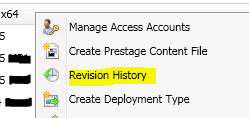
 Почему? Все дело в том, что зависимость осталась в Revision History:
Открываем и смотрим точки восстановление вашего Application.

Удаляем ненужные. Все теперь Application возможно удалить.


пятница, 24 августа 2012 г.

SCCM Site Backup

SCCM Backup это одно из заданий по обслуживанию сайтов.
Administration\Site Configuration\Sites\”site name”\Site Maintenance
 
Позволяет выбрать дни и время запуска сервиса SMSBACKUP.
Процесс бекапа перезаписывает предыдущие бекапы, что есть не совсем удобно. Однако есть простое решение. Необходимо отредактировать файл "Afterbak.bat" и поместить его сюда: C:\Program Files\Microsoft Configuration Manager\inboxes\smsbkup.box
После изменений, выглядит так:
setlocal enabledelayedexpansion
set target=\\primary_site_server_name\ConfigMgr\Backups\%date:~0,3%
If not exist %target% goto datacopy
RD %target% /s /q
:datacopy
xcopy "C:\Backups\SCCM\*" "%target%\" /E /-Y


вторник, 7 августа 2012 г.

Список исключений для антивируса

LocationFile(s)
ConfigMgrInstallDirInstall.map
ConfigMgrInstallDir\Inboxes*.adc, *.box, *.ccr, *.cfg, *.cmn, *.ct0, *.ct1, *.ct2, *.dat, *.dc, *.ddr, *.i*, *.ins, *.ist, *.job, *.lkp, *.lo_, *.log, *.mif, *.mof, *.nal, *.ncf, *.nhm, *.ofn, *.ofr, *.p*, *.pcf, *.pck, *.pdf, *.pkg, *.pkn, *.rpl, *.rpt, *.sca, *.scd, *.scu, *.sha, *.sic, *.sid, *.srq, *.srs, *.ssu, *.svf, *.tmp, *.udc
ConfigMgrInstallDir\Logs*.log
<driveletter>:\SMSPKG*.*
<driveletter>:\SMSPKGD$*.*
<driveletter>:\SMSPKSIG*.*
<driveletter>:\SMSSIG$*.*
<driveletter>:\SCCMContentLib*.*
<driveletter>:\Program Files\SMS_CCM\ServiceData*.msg, *.que, *.xml
<driveletter>:\Program Files\SMS_CCM\Logs*.log
Configuration Manager 2012 процессы:
  • Smsexec.exe
  • Ccmexec.exe
  • CmRcService.exe
  • Sitecomp.exe
  • Smswriter.exe
  • Smssqlbbkup.exe
Клиентские исключения:
  • %windir%\ccmcache                                                                                                                        
  • %allusersprofile%\NTUser.pol
  • %systemroot%\system32\GroupPolicy\registry.pol
  • %windir%\Security\database\*.chk
  • %windir%\Security\database\*.edb
  • %windir%\Security\database\*.jrs
  • %windir%\Security\database\*.log
  • %windir%\Security\database\*.sdb
  • %windir%\SoftwareDistribution\Datastore\Datastore.edb
  • %windir%\SoftwareDistribution\Datastore\Logs\edb.chk
  • %windir%\SoftwareDistribution\Datastore\Logs\edb*.log
  • %windir%\SoftwareDistribution\Datastore\Logs\Edbres00001.jrs
  • %windir%\SoftwareDistribution\Datastore\Logs\Edbres00002.jrs
  • %windir%\SoftwareDistribution\Datastore\Logs\Res1.log
  • %windir%\SoftwareDistribution\Datastore\Logs\Res2.log
  • %windir%\SoftwareDistribution\Datastore\Logs\tmp.edb
для следующих каталогов “Program Files” и “Program Files x86″:
  • %programfiles%\Microsoft Configuration Manager\Inboxes\adsrv.box
  • %programfiles%\Microsoft Configuration Manager\Inboxes\AIKbMgr.box
  • %programfiles%\Microsoft Configuration Manager\Inboxes\amtproxymgr.box
  • %programfiles%\Microsoft Configuration Manager\Inboxes\auth.box
  • %programfiles%\Microsoft Configuration Manager\Inboxes\ccr.box
  • %programfiles%\Microsoft Configuration Manager\Inboxes\ccrretry.box
  • %programfiles%\Microsoft Configuration Manager\Inboxes\certmgr.box
  • %programfiles%\Microsoft Configuration Manager\Inboxes\clifiles.src
  • %programfiles%\Microsoft Configuration Manager\Inboxes\colfile.box
  • %programfiles%\Microsoft Configuration Manager\Inboxes\coll_out.box
  • %programfiles%\Microsoft Configuration Manager\Inboxes\COLLEVAL.box
  • %programfiles%\Microsoft Configuration Manager\Inboxes\CompSumm.Box
  • %programfiles%\Microsoft Configuration Manager\Inboxes\dataldr.box
  • %programfiles%\Microsoft Configuration Manager\Inboxes\ddm.box
  • %programfiles%\Microsoft Configuration Manager\Inboxes\ddmnotif.box
  • %programfiles%\Microsoft Configuration Manager\Inboxes\despoolr.box
  • %programfiles%\Microsoft Configuration Manager\Inboxes\distmgr.box
  • %programfiles%\Microsoft Configuration Manager\Inboxes\epmgr.box
  • %programfiles%\Microsoft Configuration Manager\Inboxes\hman.box
  • %programfiles%\Microsoft Configuration Manager\Inboxes\inventry.box
  • %programfiles%\Microsoft Configuration Manager\Inboxes\invproc.box
  • %programfiles%\Microsoft Configuration Manager\Inboxes\mmctrl.box
  • %programfiles%\Microsoft Configuration Manager\Inboxes\notictrl.box
  • %programfiles%\Microsoft Configuration Manager\Inboxes\objmgr.box
  • %programfiles%\Microsoft Configuration Manager\Inboxes\offermgr.box
  • %programfiles%\Microsoft Configuration Manager\Inboxes\OfferSum.Box
  • %programfiles%\Microsoft Configuration Manager\Inboxes\pkginfo.box
  • %programfiles%\Microsoft Configuration Manager\Inboxes\PkgTransferMgr.box
  • %programfiles%\Microsoft Configuration Manager\Inboxes\policypv.box
  • %programfiles%\Microsoft Configuration Manager\Inboxes\polreq.box
  • %programfiles%\Microsoft Configuration Manager\Inboxes\rcm.box
  • %programfiles%\Microsoft Configuration Manager\Inboxes\replmgr.box
  • %programfiles%\Microsoft Configuration Manager\Inboxes\RuleEngine.box
  • %programfiles%\Microsoft Configuration Manager\Inboxes\schedule.box
  • %programfiles%\Microsoft Configuration Manager\Inboxes\sinv.box
  • %programfiles%\Microsoft Configuration Manager\Inboxes\sitecomp.box
  • %programfiles%\Microsoft Configuration Manager\Inboxes\sitectrl.box
  • %programfiles%\Microsoft Configuration Manager\Inboxes\SiteStat.Box
  • %programfiles%\Microsoft Configuration Manager\Inboxes\smsbkup.box
  • %programfiles%\Microsoft Configuration Manager\Inboxes\statmgr.box
  • %programfiles%\Microsoft Configuration Manager\Inboxes\swmproc.box
  • %programfiles%\Microsoft Configuration Manager\Inboxes\WSUSMgr.box
  • %programfiles%\Microsoft Configuration Manager\Inboxes\wsyncmgr.box
http://www.systemcenterblog.nl/2012/05/09/anti-virus-scan-exclusions-for-configuration-manager-2012/ 

пятница, 3 августа 2012 г.

SUP\WSUS error 2147500037


WSUS синхронизируется нормально, но стоит запустить синхронизацию из SCCM, начинаются ошибки:
-------------------------------------
SMS_WSUS_SYNC_MANAGER:
 WSUS Synchronization failed.
 Message: WSUS server not configured. Please refer to WCM.log for configuration error details..
 Source: CWSyncMgr::DoSync.
  The operating system reported error 2147500037: Unspecified error
-------------------------------------
SMS_WSUS_CONFIGURATION_MANAGER:
WSUS Configuration Manager failed to configure upstream server settings on WSUS Server "sccm.xxxx.local".
Possible cause: WSUS Server version 3.0 SP2 or above is not installed or cannot be contacted.
Solution: Verify that the WSUS Server version 3.0 SP2 or greater is installed. Verify that the IIS ports configured in the site are same as those configured on the WSUS IIS website.
-------------------------------------
wcm.log:
This sccm.xxxx.local system is the Top Site where WSUS Server is configured to Sync from Microsoft Update (WU/MU) OR do not Sync.~  $$<SMS_WSUS_CONFIGURATION_MANAGER><07-27-2012 10:16:43.736-240><thread=5796 (0x16A4)>
Found WSUS Admin dll of assembly version Microsoft.UpdateServices.Administration, Version=3.0.6000.273, Major Version = 0x30000, Minor Version = 0x17700111~  $$<SMS_WSUS_CONFIGURATION_MANAGER><07-27-2012 10:16:43.845-240><thread=5796 (0x16A4)>
Found WSUS Admin dll of assembly version Microsoft.UpdateServices.Administration, Version=3.1.6001.1, Major Version = 0x30001, Minor Version = 0x17710001~  $$<SMS_WSUS_CONFIGURATION_MANAGER><07-27-2012 10:16:43.846-240><thread=5796 (0x16A4)>
The installed WSUS build has the valid and supported WSUS Administration DLL assembly version (3.1.7600.226)~  $$<SMS_WSUS_CONFIGURATION_MANAGER><07-27-2012 10:16:43.846-240><thread=5796 (0x16A4)>
System.Net.WebException: The request failed with HTTP status 404: Not Found.~~   at Microsoft.UpdateServices.Administration.AdminProxy.CreateUpdateServer(Object[] args)~~   at Microsoft.UpdateServices.Administration.AdminProxy.GetUpdateServer(String serverName, Boolean useSecureConnection, Int32 portNumber)~~   at Microsoft.SystemsManagementServer.WSUS.WSUSServer.ConnectToWSUSServer(String ServerName, Boolean UseSSL, Int32 PortNumber)  $$<SMS_WSUS_CONFIGURATION_MANAGER><07-27-2012 10:16:49.168-240><thread=5796 (0x16A4)>
Remote configuration failed on WSUS Server.~  $$<SMS_WSUS_CONFIGURATION_MANAGER><07-27-2012 10:16:49.169-240><thread=5796 (0x16A4)>
STATMSG: ID=6600 SEV=E LEV=M SOURCE="SMS Server" COMP="SMS_WSUS_CONFIGURATION_MANAGER" SYS=sccm.xxxx.local SITE=378 PID=2816 TID=5796 GMTDATE=Fri Jul 27 06:16:49.169 2012 ISTR0="sccm.xxxx.local" ISTR1="" ISTR2="" ISTR3="" ISTR4="" ISTR5="" ISTR6="" ISTR7="" ISTR8="" ISTR9="" NUMATTRS=0  $$<SMS_WSUS_CONFIGURATION_MANAGER><07-27-2012 10:16:49.169-240><thread=5796 (0x16A4)>
------------------------------------------------------------------------------------------------------------
Борьба с исправлением не помогла. Решил использовать самый простой метод начать все сначала:
1) Удалить SUP роль.
2) Удалить WSUS.
3) Перезагрузка.
4) Установка WSUS используя альтернативные порты: 8530, 8531.
5) Установка SUP роли. 
6) Перезагрузка.
7) Проверить идет ли синхронизация.